HIRING SOFTWARE. BUILT AROUND REAL WORK.
See the skills.
Build your team.
We build practical assessments and custom hiring software for businesses. See how candidates handle real workplace tasks, then manage invitations, progress and results in one private dashboard.
Taking an assessment? Enter your single-use code.OUR PURPOSE
Make practical ability easier to see.
Turn the work your team actually does into clear, repeatable assessments. Give every candidate straightforward instructions and give your hiring team evidence they can review.
WATCH THE WORK HAPPEN
A better look than a résumé.
See what applicants experience before choosing the right assessment for your team.
Read video transcript
DeskProof shows computer skills through practical work in a simulated desktop. The candidate reads the directions, opens the right folder, and works with files. Next, they enter information in a spreadsheet and use the available tools to complete the task. Workplace communication brings those skills together, with an email to prepare and the requested information to include. Instructions stay close to the work, so the candidate can check each requirement as they go. After submission, the employer can review scored outcomes and task evidence. The candidate gets a clear results summary. This is a fictional demonstration. Try DeskProof at AbilityProof dot com.
Computer skills you can actually see.
Watch candidates work with files, spreadsheets and workplace email in a simulated desktop.
- Practical, familiar tasks
- Clear instructions
- Submitted work and scored outcomes
Planning your annual assessment volume? Explore first-year packages.
Need both CallProof experiences? Combine V1 + V2 in one assessment, using one code.
FROM THE TASK TO THE RESULT
Clear evidence.
A useful next step.
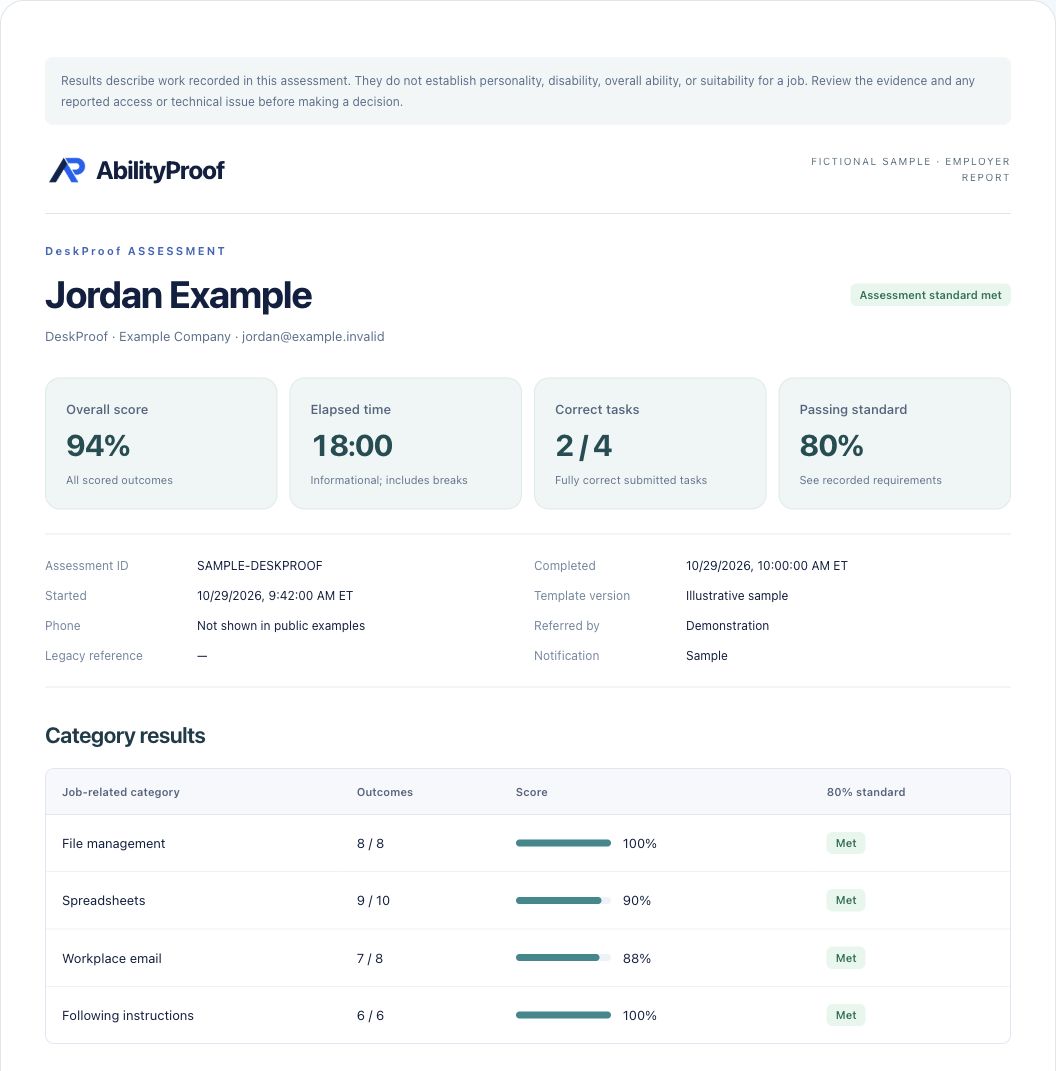
See what the employer and candidate receive after an assessment.
READY TO USE, OR BUILT FOR YOU
AbilityProof software
Practical tools to assess and build essential skills.
MORE THAN AN ASSESSMENT
Your hiring operations,
in one dashboard.
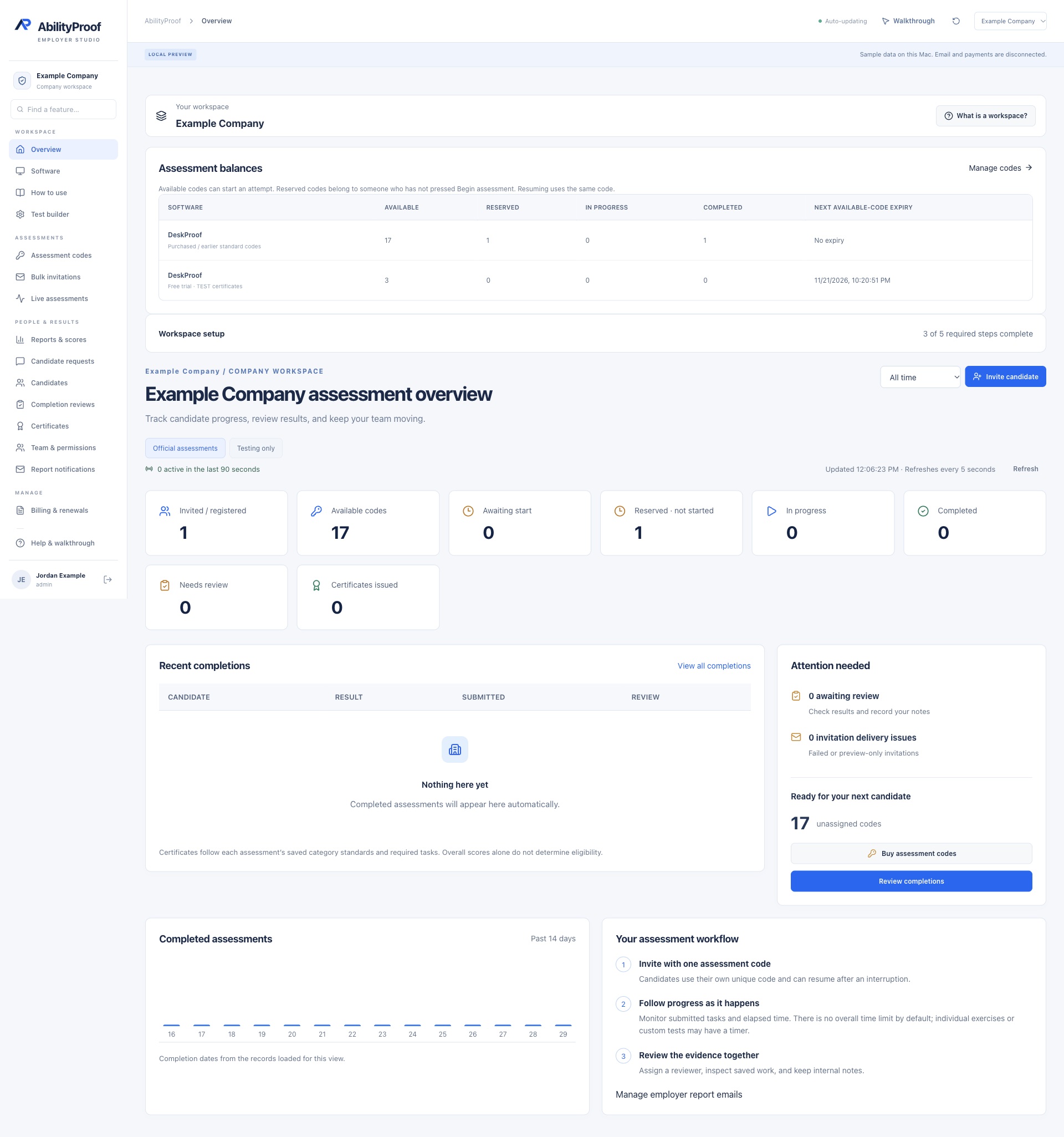
Keep your codes, candidates and results together. Your team sees only its own workspace, with access based on each person’s role.
- Send codes individually or in bulk
- Track unused, started and completed assessments
- Review reports and the original task screens
- Give administrators and reviewers their own access
 Open full screenshot ↗
Current company workspace · Fictional demonstration records. Open the full screenshot to see more.
BUILT AROUND YOUR BUSINESS
Your process could be your next advantage.
Turn your own workflows into useful software. We build custom assessments, staff-training tools, internal workflows and business websites.
Read video transcript
Every company has its own workflows. AbilityProof can build software around yours, including practical assessments, staff training, internal workflow tools, and business websites. This recording shows examples from the AbilityProof platform: a browser workspace, guided tasks, company access, and reports. A custom project starts with the work your team needs to do and the people who will use it. Together, we define the scope, access requirements, price, and delivery plan before the build begins. Private company software can be made available to the people authorized to use it. The screens here contain fictional demonstration records. Tell us what you need at AbilityProof dot com.

CUSTOM COMPANY SOFTWARE
Your company’s tools.
Enter the reusable company access code from your purchase email or administrator. It stays valid until an administrator replaces it.
Have a single-use assessment code? Start your assessment.
Staff manage codes and reports by signing in.
BEFORE YOU START
A few useful answers.
Do I need a sales call?
No. Start with a free demo or request a private offer online. Review your software, code allowance and price, then pay securely. Contact us for custom software scoped to your company.
What comes with a paid workspace?
Your code bank, individual and bulk invitations, progress tracking, reports, team roles and report-email settings. You keep the same login you used for your trial.
Can I use one code more than once?
Each code starts one assessment attempt. An interrupted attempt can be resumed. The software options included with your purchase are shown before checkout.
Does the software decide who gets hired?
No. It reports assessment performance for your team to review. Certificate requirements are explained before each assessment; demos are clearly marked as tests.